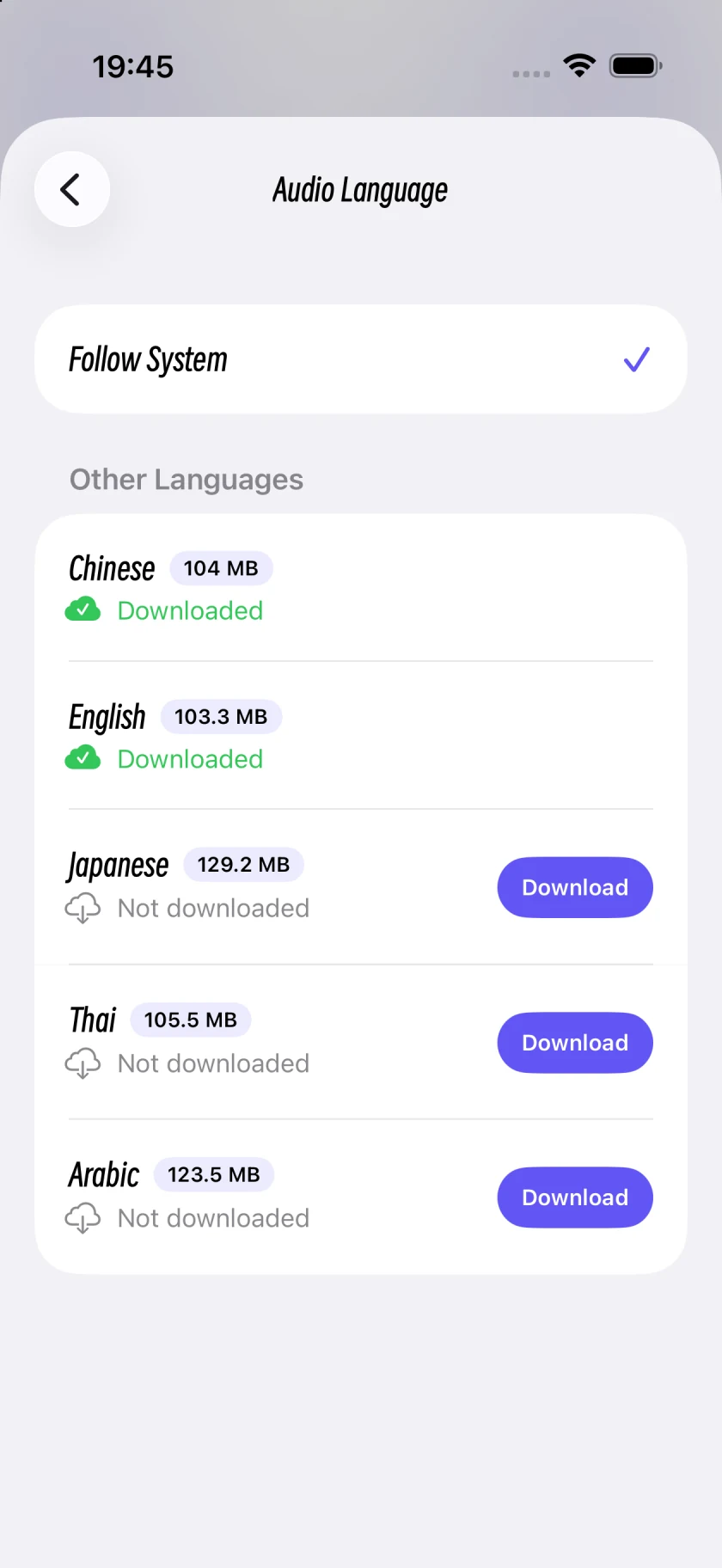
Audio language, interface language and narration voice have separate controls. First choose the language you want to hear, then select a narrator.
Step by step
1
Open Settings
Select My, then open Settings.
2
Choose the audio language
Open Meditation Audio Language. Select Follow System or Chinese, English, Japanese, Thai or Arabic, then follow the resource preparation or download instructions.
3
Choose Sound Meditation guidance
In the sound player, open Edit Sounds. Under Voice, choose Narration Voice, then Male Voice or Female Voice.
4
Choose a guided-audio narrator
In a guided-audio player, open the sliders button, Playback Controls. Under Narration Voice, choose Mali or Oat. Mali is the female voice; Oat is the male voice.
Screens captured in Oat Meditation 1.048 on an iPhone Simulator. Controls may be arranged differently on iPad; use the button names to find the same options.
Want to change the interface language?
App Language opens iOS Settings. It is separate from Meditation Audio Language. Check whether you want to change button labels or the language spoken in a session.
No audio after changing language?
Check that resource preparation or downloading has completed. If the page shows a failure, use its retry option and check your connection before returning to the player. Do not assume every language is already downloaded.